Proposal
Splitly – Group Expense Sharing Platform
AWS-Centered Solution for Group Expense Management, Sharing, and Settlement
1. Executive Summary
Splitly is a group expense management and sharing platform designed to help users track shared expenses, calculate outstanding balances, and manage the payment process among group members in a transparent and convenient manner.
The system is built using a modern web architecture with React + Vite for the user interface, Node.js/Express for the backend service, and MongoDB Atlas as the database. The infrastructure is deployed on AWS, using Amazon EC2 to host the backend and frontend applications, Amazon S3 to store receipts and supporting images, Amazon CloudWatch for system monitoring, and Amazon VPC and Security Groups to ensure secure network connectivity.
The platform provides key functions such as group management, expense recording and sharing, balance calculation, payment status tracking among members, and electronic receipt storage. The architecture is designed to be easily scalable and suitable for small- to medium-sized user groups.
2. Problem Statement
Current Problems
Group expense management is currently often handled manually through spreadsheets or messaging applications. As the number of members and expenses increases, tracking who has paid, who still owes money, and how much needs to be settled becomes complicated and prone to errors.
Common challenges include:
- Difficulty managing multiple expenses within the same group.
- Calculating outstanding balances among members is time-consuming and prone to mistakes.
- Lack of centralized storage for receipts and supporting documents for later verification.
- Lack of a clear mechanism for tracking payment status between debtors and recipients.
- Difficulty monitoring system activities and troubleshooting issues after deployment.
Solution
The proposed solution is to build Splitly on the AWS platform to digitize group expense management. The system provides centralized functionality for group management, expense recording, balance calculation, payment tracking, and receipt storage, while leveraging AWS services to ensure efficient deployment, storage, monitoring, and system operations.
Benefits and Return on Investment (ROI)
The deployment of Splitly provides several benefits, including:
- Reducing the time required to calculate and reconcile balances among group members.
- Minimizing errors during expense splitting and payment settlement.
- Increasing transparency through centralized transaction history and payment status tracking.
- Supporting electronic receipt storage for easier retrieval and verification when needed.
- Monitoring system operations through Amazon CloudWatch, improving system availability and troubleshooting capabilities.
3. Solution Architecture
The project uses a Monolithic Architecture for the application layer, in which the Frontend, Backend, and Web Server are deployed on a single Amazon EC2 instance. The system is deployed in the AWS ap-southeast-1 Region, within a VPC using the CIDR block 10.0.0.0/16. The EC2 instance is located in Public Subnet 10.0.1.0/24 within Availability Zone A.
The overall architecture can be divided into the following layers:
Presentation Layer – Frontend
- The React/Vite frontend is built into static files, including HTML, CSS, and JavaScript.
- These static files are stored directly on the EC2 instance and served through the Nginx Web Server.
- Users access the website through a web browser using the Elastic IP associated with the EC2 instance.
- User traffic passes through the Internet Gateway into the Public Subnet and then reaches the EC2 instance through HTTP port 80.
- Nginx is responsible for serving the frontend interface to users.
Application Layer – Backend
- The Node.js backend and Nginx Web Server are deployed on the same Amazon EC2 instance, representing the monolithic architecture of the application.
- The EC2 instance is located in a Public Subnet and can receive web traffic from the Internet through the Internet Gateway.
- The Web Security Group controls inbound traffic to the EC2 instance, with port 80 exposed to serve HTTP traffic from users.
- Nginx also acts as a Reverse Proxy, routing REST API requests, such as requests under the
/apipath, to the Node.js backend running internally on the EC2 instance and typically managed by PM2. - Required outbound connections, such as connections to MongoDB Atlas or third-party services such as VNPay and Gmail SMTP, are initiated from the EC2 instance to the Internet through the Internet Gateway.
- Traffic to Amazon S3 does not directly pass through the Internet Gateway. Instead, it is routed through the VPC Gateway Endpoint for S3.
Data Layer
- Business data, including user information, groups, expenses, payment transactions, disputes, and notifications, is stored in MongoDB Atlas, a SaaS database service outside the project’s AWS infrastructure.
- The EC2 instance connects to MongoDB Atlas through an outbound connection via the Internet Gateway, using secure protocols such as TLS/SSL to protect data in transit.
- Files and payment receipt images are stored separately in the Amazon S3 Receipts Bucket.
- When users upload or retrieve receipts, the Backend running on EC2 performs operations such as
PutObjectandGetObjecton Amazon S3. - With the newly added VPC Gateway Endpoint for S3, traffic between the EC2 instance and S3 is routed internally through the AWS network via the endpoint instead of passing through the public Internet.
- MongoDB stores only file metadata, such as the file name, object key, URL, or processing status, rather than the physical files themselves. This approach reduces database storage requirements, optimizes storage costs, and improves file-processing efficiency.
Security, Monitoring, and Cost Management
- IAM Role: The EC2 instance is attached to an IAM Role that grants the permissions required to access the S3 Receipts Bucket and send monitoring data to CloudWatch. This approach eliminates the need to store Access Keys or Secret Keys directly on the server.
- VPC Gateway Endpoint for S3: This endpoint allows the EC2 instance to access S3 through a private path within the AWS network. This makes receipt uploads and downloads more secure, reduces reliance on the Internet Gateway, and follows the principle of minimizing the transmission of sensitive data over the public Internet.
- Web Security Group: The Security Group restricts the ports that can be accessed on the EC2 instance. Port 80 is used for web traffic. For server administration, the current architecture prioritizes AWS Systems Manager Session Manager, which can reduce or eliminate the need to expose SSH port 22 directly to the Internet.
- Systems Manager Session Manager: This service is used to securely administer the EC2 instance without relying on traditional SSH access. This reduces the risk of attacks against the SSH port and improves control over administrative activities.
- Configuration Management: Sensitive information such as the MongoDB URI, JWT secret, Gmail configuration, VNPay credentials, and other environment variables are currently configured in a
.envfile on the EC2 instance. In a production environment, these secrets should be strictly access-controlled and may be migrated to AWS Systems Manager Parameter Store or AWS Secrets Manager for improved security. - Monitoring: Amazon CloudWatch is used to collect system metrics and logs and monitor the operational status of EC2, Nginx, and the Node.js Backend. When errors or threshold violations are detected, CloudWatch can trigger alerts through Amazon SNS.
- Cost Management: AWS Budgets is used to monitor AWS resource costs. When spending exceeds the expected budget threshold, the system sends alerts via email or SNS, helping the development team control operational costs.
3.1 Current Architecture
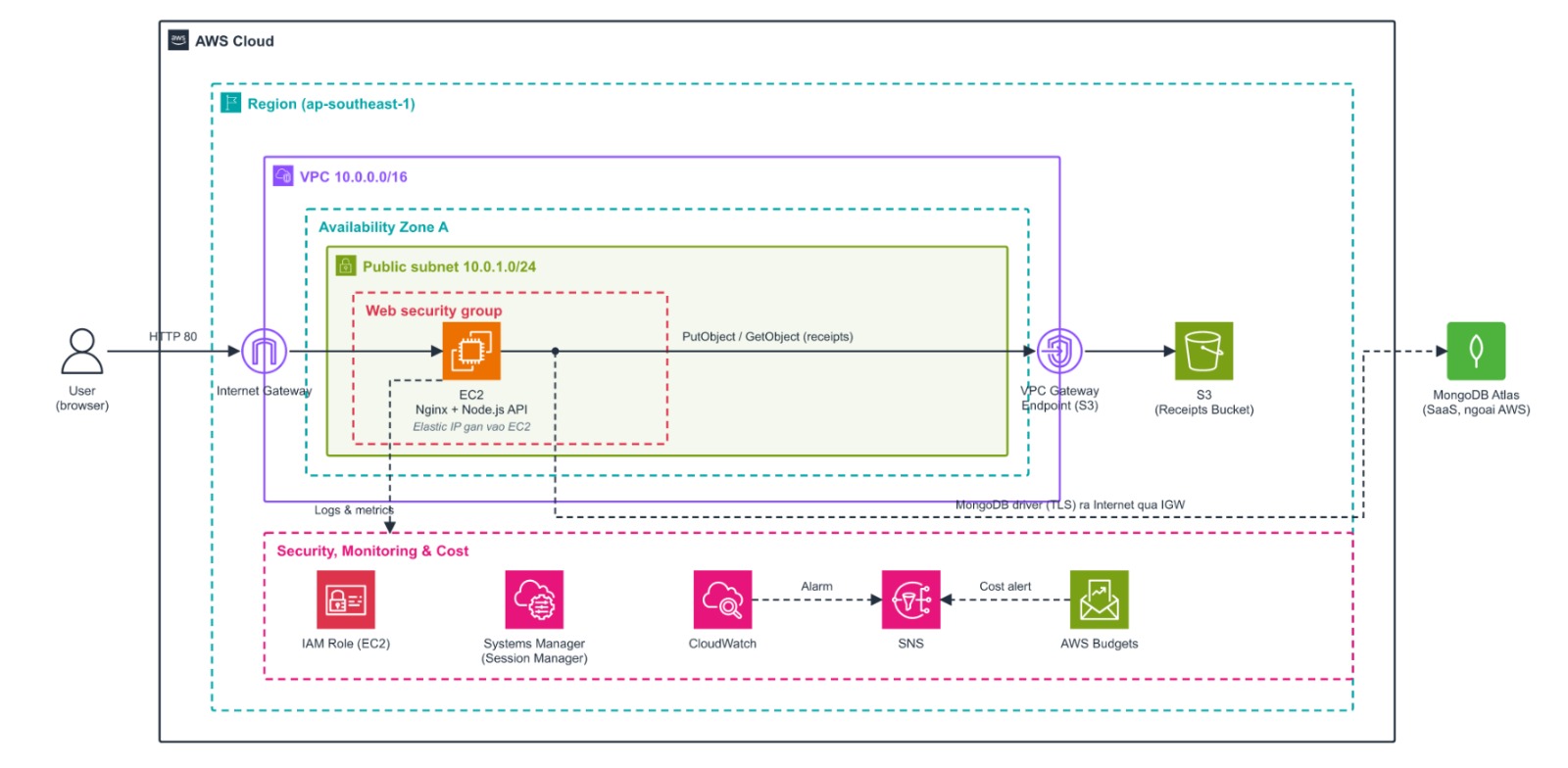
AWS Services Used
- Amazon S3: Stores receipt files uploaded by users.
- Amazon EC2: Hosts the backend API and handles the system’s business logic.
- AWS IAM: Provides permissions for the EC2 instance to access required AWS resources.
- Amazon CloudWatch: Collects logs, monitors EC2, and detects system issues.
- Amazon SNS: Sends email notifications or alerts from CloudWatch and AWS Budgets.
- AWS Budgets: Monitors costs and sends alerts when spending exceeds the defined budget threshold.
Component Design
-
Web Interface & Proxy: The Frontend application, built with React/Vite, is compiled into static files and stored and served directly by the Nginx Web Server running on Amazon EC2. Nginx also acts as a Reverse Proxy to route API requests from users to the Backend.
-
Business Logic Processing (Backend): Amazon EC2, which hosts both the web interface and backend, runs the Backend API using Node.js/PM2. It is responsible for authentication, group management, expense management, payment processing, receipt management, dispute handling, and notifications.
-
Data Storage: MongoDB Atlas stores core business data, including users, groups, expenses, settlements, disputes, and notifications.
-
Receipt Storage: Amazon S3 (Receipts Bucket) stores receipt images and files uploaded by users, reducing the need for local storage on EC2.
-
Network Connectivity: Amazon VPC, Public Subnet, Internet Gateway, and Elastic IP provide the basic network infrastructure, allowing EC2 to communicate with users, upload files to S3, connect to MongoDB Atlas, and communicate with external services such as the VNPay payment gateway and Gmail SMTP.
-
System Protection: The Web Security Group acts as a firewall, restricting the ports and network sources allowed to access the EC2 instance, such as allowing port 80 for web traffic and, where required, port 22 for SSH administration.
-
Configuration & Secret Management: Sensitive system information, including the MongoDB URI, JWT Secret, Gmail credentials, and VNPay credentials, is currently stored as environment variables in a
.envfile directly on the EC2 instance. -
Access Management: An AWS IAM Role grants the EC2 instance the required permissions, following the principle of least privilege, to securely access the S3 Receipts Bucket and CloudWatch without storing Access Keys on the server.
-
System Monitoring: Amazon CloudWatch operates in the background to collect application logs, monitor EC2 resource metrics such as CPU, RAM, and disk usage, and generate alerts when issues are detected.
-
Alerting: Amazon SNS acts as the notification channel, delivering email or other notification messages from CloudWatch and AWS Budgets to administrators.
-
Cost Management: AWS Budgets continuously monitors AWS infrastructure costs and triggers alerts when actual spending reaches or exceeds the predefined budget threshold.
3.2 Proposed Future Architecture
The following diagram illustrates the proposed upgraded architecture for the Splitly system. This architecture is not included in the current implementation scope but is planned as the next development phase.
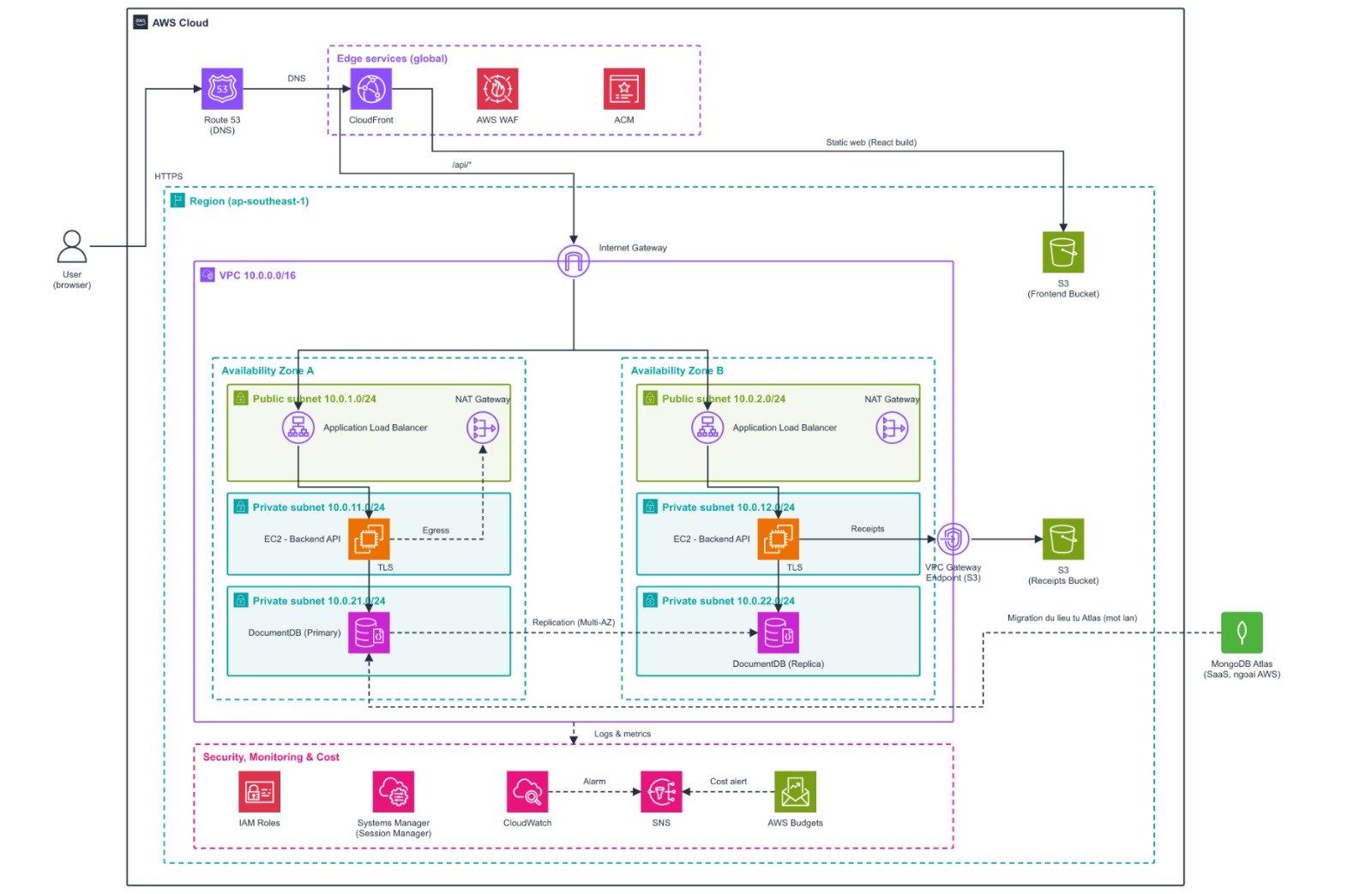
In the upgraded architecture, the React/Vite frontend is hosted on Amazon S3 and distributed through Amazon CloudFront. Amazon Route 53 manages the domain name, AWS Certificate Manager provides HTTPS certificates, and AWS WAF helps protect the application against abnormal or malicious requests.
The Node.js/Express backend is deployed on Amazon EC2 instances within Private Subnets across two Availability Zones and receives traffic through an Application Load Balancer. The system uses Amazon DocumentDB for database services and an Amazon S3 Receipts Bucket for receipt storage. NAT Gateway provides outbound Internet connectivity when required, while CloudWatch, SNS, and AWS Budgets are responsible for monitoring, alerting, and cost management.
3.3 Planned Improvements
The new architecture provides the following key improvements:
- Separating the frontend and backend.
- Moving backend EC2 instances into Private Subnets to improve security.
- Deploying the system across two Availability Zones to improve availability.
- Distributing traffic through an Application Load Balancer.
- Reducing the workload on EC2 and improving access performance through CloudFront.
- Supporting a custom domain name and HTTPS connectivity.
- Strengthening application security with AWS WAF.
- Using Amazon DocumentDB within a private network instead of an external database service.
- Improving system scalability, monitoring, and cost management.
4. Technical Implementation
The project deploys the entire frontend and backend on a single Amazon EC2 instance in the AWS Singapore Region (ap-southeast-1), combined with AWS services and MongoDB Atlas. The implementation process consists of four main stages:
-
Architecture Research and Design: Analyze the frontend and backend source-code structure; study EC2, VPC, IAM, S3, VPC Gateway Endpoint, Systems Manager, CloudWatch, SNS, AWS Budgets, MongoDB Atlas, Nginx, and PM2 to design a suitable architecture.
-
Cost Estimation and Feasibility Analysis: Use AWS Pricing Calculator to estimate the costs of EC2, S3, network traffic, and CloudWatch. Select an appropriate instance type for the scale of a student project and configure AWS Budgets to control costs.
-
Infrastructure Setup: Create the VPC, Public Subnet, Internet Gateway, Security Group, EC2 instance, and Elastic IP. Create the S3 Receipts Bucket and configure the VPC Gateway Endpoint for S3, IAM Role, AWS Systems Manager Session Manager, MongoDB Atlas, CloudWatch, SNS, and AWS Budgets.
-
Development, Testing, and Deployment: Clone the source code from GitHub to EC2, configure the
.envfile, build the frontend using React/Vite, and deploy the backend using Node.js/Express. Nginx serves the frontend and reverse-proxies API requests to the backend running on port5000, while PM2 manages the backend process. The system is tested for connectivity with MongoDB Atlas, S3, VNPay, Gmail, API endpoints, and receipt upload functionality before being put into operation.
Technical Requirements
Architecture and Infrastructure
The system runs on a single EC2 instance in a Public Subnet within a VPC in the Singapore Region. EC2 uses an Internet Gateway and Elastic IP for Internet connectivity, while a VPC Gateway Endpoint is used to access Amazon S3 directly from the VPC.
Technology Stack
- Frontend: React, TypeScript, and Vite.
- Backend: Node.js, Express, and TypeScript, providing REST APIs.
- Web Server & Process Manager: Nginx is installed as the Web Server and Reverse Proxy, while PM2 is used to manage and automatically restart the backend process.
Source Code Management and Deployment
The source code is managed on GitHub and deployed directly to EC2 through the command line. Sensitive information is stored in a .env file and is not committed to the repository.
Data and Storage
Core business data is securely stored in MongoDB Atlas. Static files, including images and receipts uploaded by users, are transferred to the Amazon S3 Receipts Bucket to optimize storage.
Networking and Connectivity
The EC2 server communicates with the Internet through the Internet Gateway and Elastic IP. The Security Group is configured to allow port 80 for web traffic and port 22 for administrator SSH access where required. Nginx is responsible for routing traffic by either serving static frontend files or proxying API requests to the backend running on port 5000.
Security and Access Control
The EC2 instance is attached to an IAM Role following the principle of least privilege to access S3, Systems Manager, and CloudWatch. AWS Systems Manager Session Manager is used to administer the EC2 instance, reducing the need to expose SSH port 22 directly to the Internet.
Monitoring and Alerting
Amazon CloudWatch is configured to collect server metrics and application logs. Amazon SNS acts as the notification channel and sends alerts to the administrator’s email when the system encounters errors or when resources become overloaded.
Cost Management
AWS Budgets continuously monitors the costs of the AWS ecosystem and automatically sends alerts when actual or forecasted spending approaches the configured budget limit.
Non-Functional Requirements
The system is deployed in the Singapore Region to optimize and minimize network latency for users accessing the application from Vietnam. The EC2-based architecture is appropriate for a student project budget and can be vertically scaled by increasing CPU and RAM resources if traffic increases.
5. Implementation Roadmap & Milestones
The project is planned to be implemented in four main phases over approximately three months to ensure that development, testing, and deployment are carried out systematically.
Phase 1 – Requirements Analysis and System Design (Weeks 5–6)
- Analyze the business requirements of the group expense management system.
- Design the overall AWS architecture.
- Design the MongoDB Atlas database.
- Develop the user interface and Backend architecture.
Phase 2 – Feature Development (Weeks 7–8)
-
Develop the Frontend using React + Vite.
-
Develop APIs using Node.js and Express.
-
Integrate MongoDB Atlas.
-
Implement the following features:
- Authentication
- Group Management
- Expense Management
- Settlement
- Receipt Upload
Phase 3 – AWS Deployment (Weeks 9–10)
- Launch an Amazon EC2 instance.
- Configure the VPC, Security Group, and Elastic IP.
- Deploy the Backend and Frontend to EC2.
- Create an Amazon S3 Bucket for receipt storage.
- Configure the IAM Role.
- Set up CloudWatch Monitoring.
Phase 4 – Testing and Finalization (Weeks 11–12)
- Perform functional testing.
- Perform API testing.
- Test receipt upload functionality.
- Verify logging and monitoring.
- Optimize AWS costs.
- Finalize project documentation and reports.
6. Budget Estimation
The system is designed for a small-scale environment intended for learning and experimentation. Therefore, the project prioritizes services with the lowest possible operating costs.
Estimated Infrastructure Costs
- Amazon EC2: Approximately USD 7–8/month using a
t3.microinstance to run both the Nginx Web Server and Node.js Backend. - Amazon S3 Standard: Approximately USD 0.10–0.12/month, assuming 5 GB of receipt storage and a low volume of PUT/GET requests.
- Amazon CloudWatch: Approximately USD 0.00–0.05/month for basic EC2 monitoring metrics and low-volume application log storage.
- Amazon SNS: USD 0.00/month, assuming approximately 100 alert emails per month and usage remains within the applicable SNS free tier.
- Amazon VPC: USD 0.00/month, including one VPC, Public Subnet, Route Table, Internet Gateway, and Security Group. The system does not use a NAT Gateway.
- Public IPv4 Address: Approximately USD 3.65/month, based on an estimated charge of USD 0.005 per IPv4 address per hour.
- AWS IAM: USD 0.00/month for IAM Role and access management.
Estimated Total Cost
The estimated total cost is approximately USD 10.75–11.82/month, equivalent to approximately USD 129.00–141.84 per 12 months.
During the development phase, the team plans to use low-cost services and store security configuration directly on the server through a .env file to minimize operational costs. Once the system is stable and operational, actual costs will be continuously monitored through AWS Budgets and can be recalculated using AWS Pricing Calculator if actual user traffic exceeds the initial estimates.
7. Risk Assessment
Risk Matrix
- EC2 Failure: High impact, low probability.
- MongoDB Atlas Connectivity Failure: High impact, low probability.
- Receipt Upload Failure: Medium impact, low probability.
- Secret Information Exposure: High impact, medium probability.
- Incorrect Security Group Configuration: High impact, low probability.
- Exceeding the AWS Free Tier: Medium impact, medium probability.
Mitigation Strategies
- Configure CloudWatch and SNS to monitor the health of the EC2 instance.
- Configure AWS Budgets to send alerts when costs exceed the defined threshold.
- Use IAM Roles instead of Access Keys when accessing AWS services.
- Configure Security Groups according to the principle of allowing only required ports.
- Periodically verify connectivity between EC2 and MongoDB Atlas.
Contingency Plan
- Restart or redeploy the EC2 instance from the source code if a system failure occurs.
- Restore receipt files from Amazon S3.
- Restore configuration from the GitHub repository.
- Use MongoDB Atlas Backup to recover the database in case of database failure.
- Adjust service configurations or resource limits if AWS costs exceed the allocated budget.
8. Expected Outcomes
Technical Outcomes
- Successfully build and operate the Splitly system on AWS, supporting group management, expense management, settlement, and receipt storage.
- Deploy the application on Amazon EC2, store receipts using Amazon S3, and connect to MongoDB Atlas for business data management.
- Configure Amazon CloudWatch, Amazon SNS, and AWS Budgets to monitor the system, send alerts, and control operational costs.
- Apply IAM Roles and Security Groups to strengthen security while ensuring that the system can be expanded in the future.
Value Delivered
- Help users manage group expenses transparently while reducing errors during expense calculation and settlement.
- Provide centralized receipt storage for easier retrieval and verification when needed.
- Provide a foundation that can be further extended with AWS services such as CloudFront, Route 53, AWS WAF, Auto Scaling, and CI/CD in future development phases.
- Serve as a practical product for learning and research while providing a foundation for future group financial management projects.